- Target Audiences
- TRE Operator
- Contributor
- Time to read
- 10 min
TRE Layer Components
Prerequisites
- Understanding of Five Safes TES Context C4 diagram.
Core Components
Summary
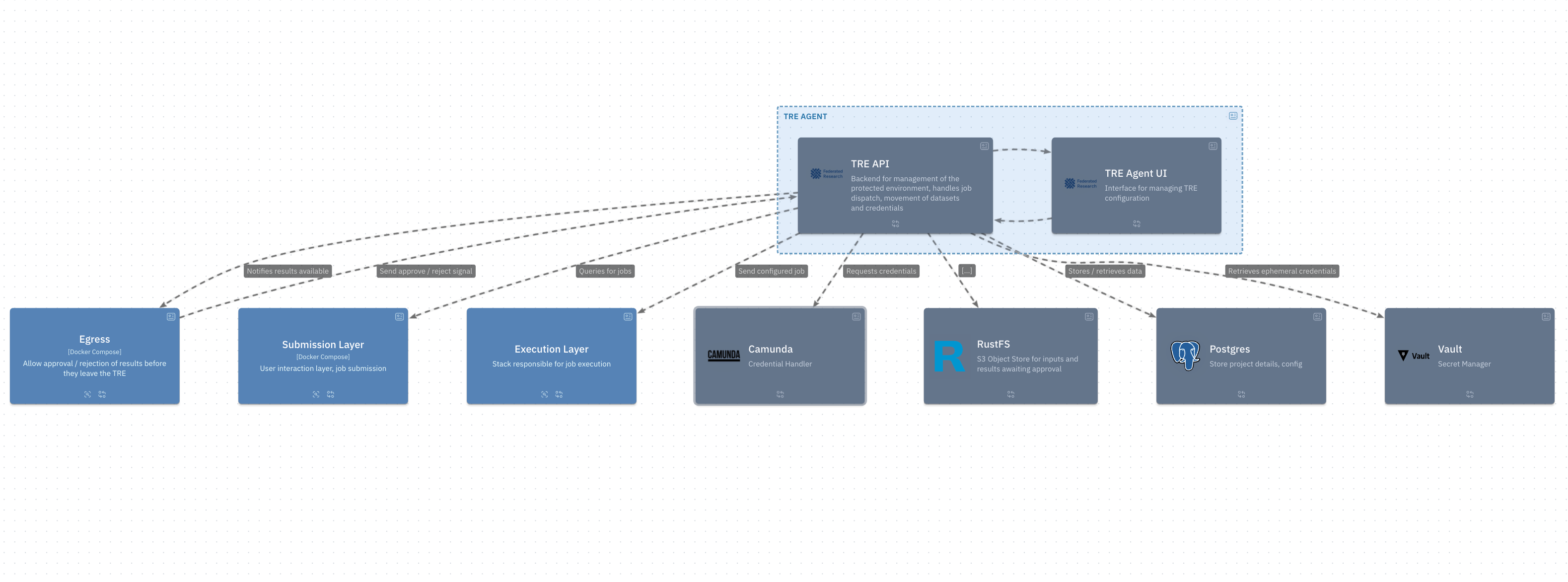
Here is a summary of the required components which make up the TRE Layer:
| Component | Notes |
|---|---|
| KeyCloak | The TRE Agent and Egress apps each require a Keycloak realm containing users and clients authorised to access them |
| S3 (MinIO or RustFS) | An Amazon S3 compatible TRE Storage service |
| RabbitMQ | A message broker used for queueing |
| PostgreSQL | A database for the TRE Agent and Egress apps to keep local state |
| Hashicorp Vault | Used for accessing ephemeral credentials as secrets |
| OpenLDAP | Used to provide ephemeral credentials for Trino (if in use as a datasource) |
| Camunda Connectors | A REST API allowing other services (e.g. TRE Agent) to integrate with Camunda |
| Camunda Orchestration | A consolidated service that combines Camunda functionality via Zeebe + Operate + Tasklist |
| ElasticSearch | Used for Camunda’s local datastore such as workflow state |
| TRE-Camunda | A service defining the handlers for ephemeral credentials management. Registers the handlers with Camunda, via Zeebe |
| TRE Agent API | A REST API for TRE Agent functionality |
| TRE Agent GUI | A Web Frontend for TRE Admins to log into and interact with the TRE Agent |
| Egress API | A REST API for Egress Portal functionality |
| Egress GUI | A Web Frontend for Egress Officers to log into and interact with the Egress Portal |
| TES Backend | A standard GA4GH TES implementation to execute the analysis |
You may choose how to distribute your own deployment of these components, as long as they are able to communicate with each other over the network.
For some components, such as KeyCloak or S3 (MinIO or RustFS), you may wish to use your own existing deployments.
User accessible components
A subset of the components will need to be accessible by users, outside of the TRE Layer environment, through a reverse proxy or port forwarding:
| Component | Reason | Sample Port * |
|---|---|---|
| KeyCloak | So that users can authenticate and admins can manage the TRE Agent and Egress KeyCloak Realms (if you are using the internal, built-in KeyCloak) | 8085 |
| TRE Agent GUI | So that TRE Admins can log into and interact with the TRE Agent | 8989 |
| TRE Agent API | So that TRE Agent GUI browser functionality, and optionally other services, can interact with the TRE Agent REST API | 8072 |
| Egress GUI | So that Egress Officers can log into and interact with the Egress Portal | 8100 |
| S3 UI | So that Egress Officers can interact with the S3 storage through a web interface | 9003 |
Note: Sample ports are provided for reference only. It can be modified to reflect the your own infrastructure and configuration choices.
If you are setting up a reverse proxy for S3 (MinIO or RustFS), the Websockets Support should be
enabled for S3 GUI Proxy host.
TRE Database
A TRE database is the database which the analysis query runs against.
If a TRE database is deployed in cloud managed instances (for example, AWS RDS, Azure SQL DB Managed Instance, etc.), this 5 Safes TES implementation requires that you set the TRE Agent with the admin credentials of the TRE database, in order to create and revoke ephemeral credentials. This can be done by setting the environment variables TRE_DATA_USER and TRE_DATA_PASSWORD with the credentials of the user, more details here .
admincredentials are the ones used when creating or setting up the TRE DB instance.- If the TRE decides to use PostgreSQL as the database, version 16 or later is required. Because, in Postgres 16+, to revoke a user/role, either
superuseroradminprivilege is required. More details here . - A user created with the
CREATEROLEpermission can create ephemeral credentials but cannot revoke them. - In the case where a TRE cannot not use
admincredentials, the TRE database can be hosted in the samepostgresqldatabase instance, which keeps the local state of TRE Agent, and superuser credentials of thepostgresqlcan be used in the environment variablesTRE_DATA_USERandTRE_DATA_PASSWORD.
Remember the TES Backend’s environment will also need network access to project data sources or TRE database, in order for analysis to run against them.