Overview of 5 Safes TES
Architecture : Five Safes TES
The 5 Safes TES (Task Execution Service) is designed to handle sensitive data analysis within a secure and controlled environment. The architecture followed by a Fan-out pattern for the implementation and is organized into multiple layers and application components.
Aggregation is supported via external tools and after 5S-TES completes analysis tasks, users can run a dedicated aggregation tool to collect and summarise results. Check Run an Analysis section for an example aggregation.
The 5 Safes TES is divided into multiple layers of process and multiple app stack as discussed below.
The layers of the architecture are:
- Submission Layer: Entrypoint for user requests, authentication, and authorisation.
- Storage Layer (User): Centralized storage for user inputs, metadata and artefacts.
- TRE Layer: Core processing layer for data analysis.
- Storage Layer (Collection of Results): Secure storage for storing analysis results for the data owner.
The Five Safes TES app stack includes:
- Submission App: Handles user submissions.
- TRE Agent App: Manages task execution within the TRE for data analytics.
- Egress App: Controls the release of results to users
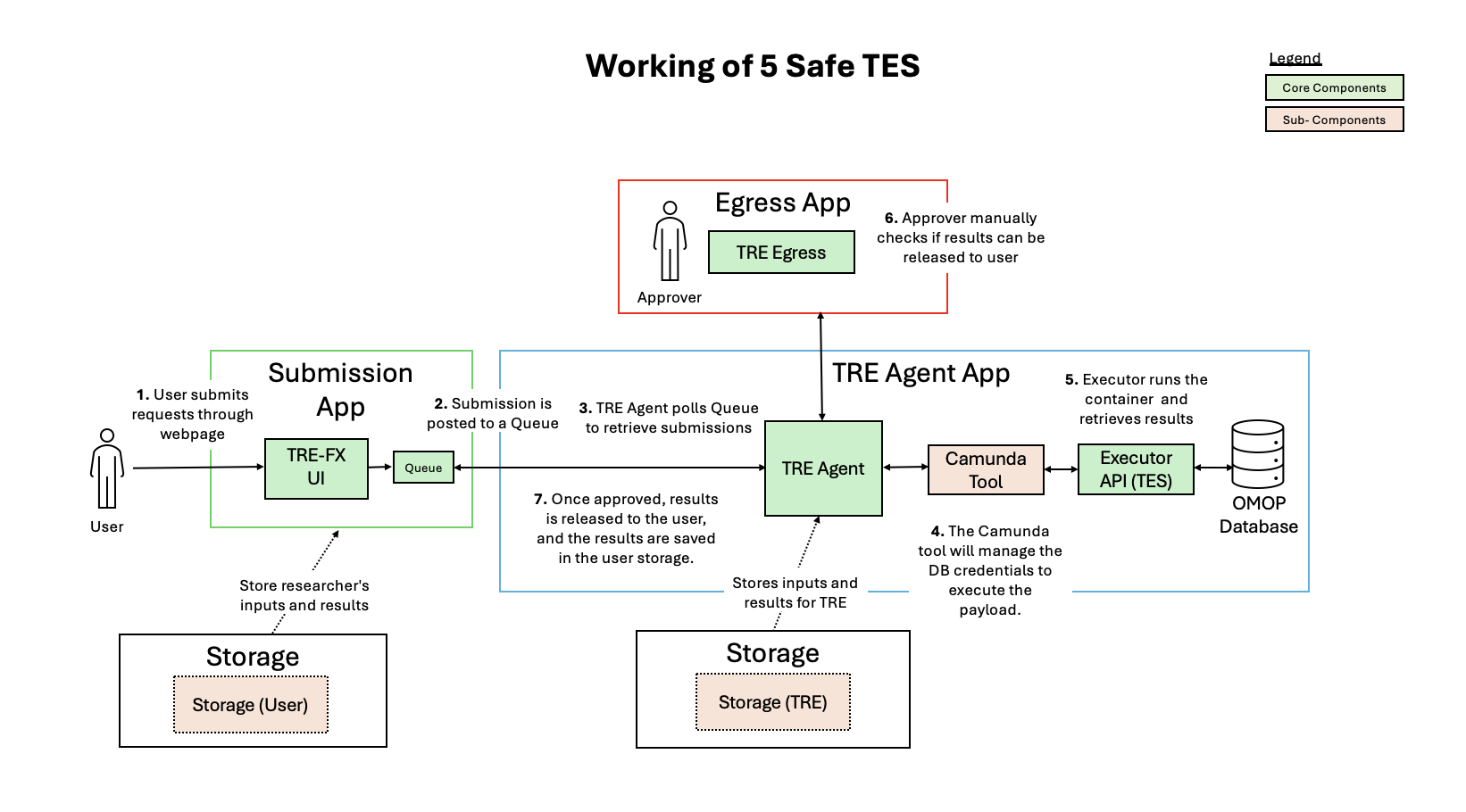
Figure 1: illustrates app structure and working of Five Safe TES Architecture
Operational Overview: Five Safes TES
The high level overview of working of the Five Safes TES is as follows:
Submission App-
The process begins with the end user or researcher submitting a request for the desired analysis through the Trusted Research Environments. Then, authentication and authorisation checks are performed to ensure the user is assigned to the relevant project.
-
The request is then placed in a queue as a task for the corresponding nodes in the federated network, and the user is notified that their request has been accepted.
-
The TRE Agent in the TRE Layer monitors the queue for new jobs (tasks). Once identified, the task are taken from the queue and sent to TREs.
-
Then, a tool called Camunda will dynamically inject the database credentials into the environment variables of the TES message, which Executor will use to connect to the database.
-
The standardised payload is pulled by the Executor, then the analysis will be executed over the database.
-
The results of this analysis are then saved in storage at the TRE Agent Owner Level.
-
After the analysis results are stored, the TRE notifies the data owner (a designated human reviewer) to approve the release of results.
-
The owner can now reviews the output and, if approved, authorises the egress.
-
Upon approval, the results are retrieved from storage and sent back through the submission layer and finally, the end user or researcher receives their requested analysis results.