- Target Audience
- TRE Operator
Controlling TRE Data Access
Prerequisites
- TRE agent deployed
- Access to the TRE UI
- TRE admin credentials
- TRE data source connection details
- Knowledge of how the TRE grants access to its DB
Configuring DMN Rules
Log in to the TRE Layer UI and navigate to the “DMN Rules” section.
This page helps to set the values which are used by the TES backend (e.g., Funnel) to connect to the TRE DB using short-lived, ephemeral credentials rather than static, long-lived ones - reducing the risk of credential leakage or reuse.
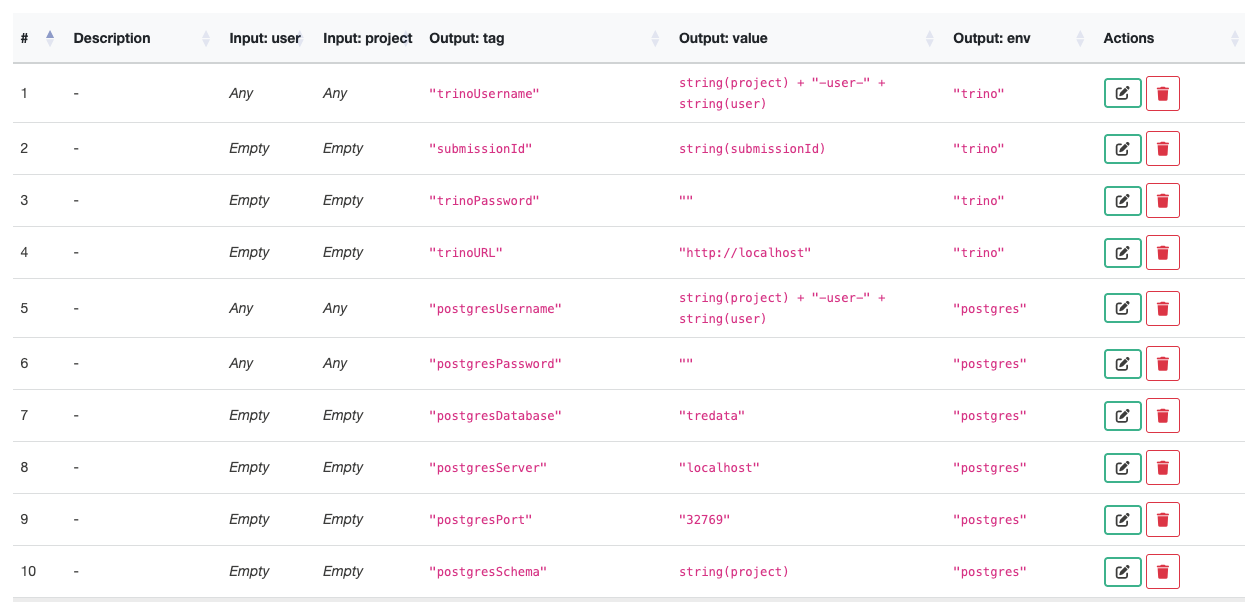
Find the rules with the following tags and change them to match the values of the TRE DB credentials.
| Output:tag | Output:value |
|---|---|
| postgresDatabase | change to the TRE DB database name |
| postgresServer | change to the TRE DB host |
| postgresPort | change to the TRE DB port |
- 5S-TES has been tested and confirmed working with Postgres. Trino and S3 are supported in principle but not yet fully verified.
- More details about TRE DB can be found here.
Notices
- Any string value put into an output value should be inside double quotes. For example:
"public". If the output values refer to input variables, double quotes are not required, for example,string(project). See Camunda DMN rule convention for more details. - The value of
postgresSchemadefaults to the project name in the Submission Layer. If the OMOP CDM is under a different schema, change the value to the actual lowercase schema name in double quotes.
Last updated on