- Target Audience
- Federation Operator
Adding a New Researcher
This guide describes how to add a new Researcher to the Keycloak instance.
Prerequisites
- A Submission Layer Administrator user - Submission Layer’s Keycloak Admin has to create a Submission Layer Admin user with
dare-control-adminrole using this guide - A Submission Layer Researcher user - Submission Layer’s Keycloak Admin has to create a new user in Keycloak with the
default-roles-dare-controlrole using this guide - Access to the Submission Layer as a Submission Layer administrator user
Steps
Login to the Submission Layer
Login to the Submission Layer as Submission Layer Administrator.
Open the Create New User page
Select the People tab at the top of the home page. This will display the list of existing users.
Click the blue + Create New User button at the top-right of the People page. This will open the Create User page.

Fill in the Researcher details
Enter the user details:
-
Full Name (mandatory)
-
Username (mandatory)
-
Email (mandatory)
The username must match the username entered into Keycloak for the same Researcher user.
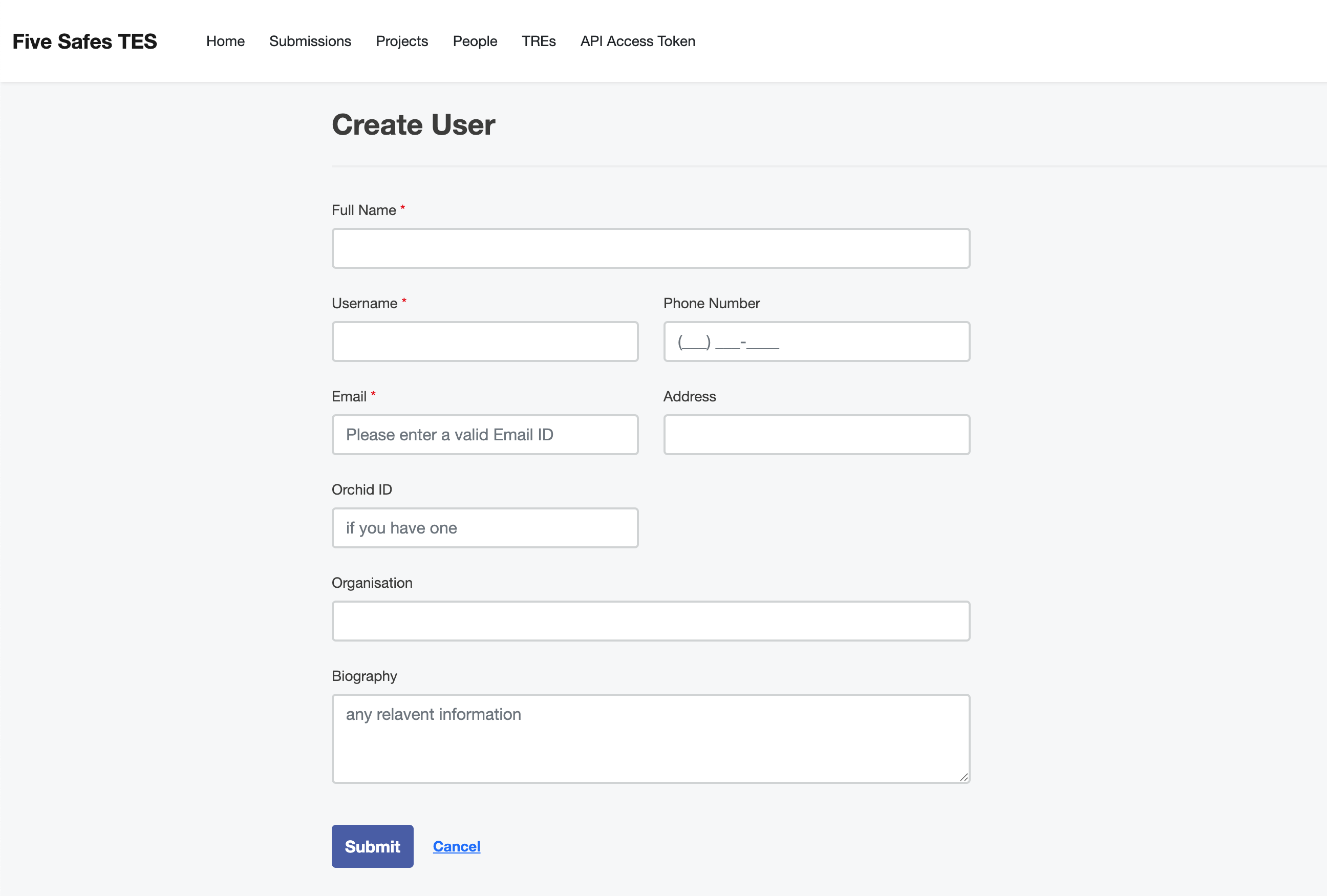
Submit the form
Once all details have been added click the blue Submit button. This will return you to the People page, where the new user will be displayed.
What’s next?
Last updated on